3D Product Visualization for B2B Sales Teams (2026)
3D product visualization for B2B sales in 2026: what AI tools like Meshy changed about the cost of a model, how manufacturers use 3D on their sites, and how to present a product in 3D on a live sales call.
3D product visualization means showing a product through an interactive 3D model, renders or augmented reality instead of photos alone. Most guides to it are written for online stores: spin the sneaker, cut the returns. This one is for B2B sellers of machines, furniture ranges and medical or aesthetic devices, where a deal runs through several people and the product rarely fits in the back of a car. Two things have changed. AI tools such as Meshy now turn a few product photos into a 3D model in minutes, for cents in credits on a paid plan. And the same model file can sit on your product page, in a buyer's phone as AR and on a live sales call. You'll get the reasons 3D now belongs in the sales kit, the four ways to get a model and what each costs, how manufacturers use 3D on their sites, and how to present a product in 3D on a call.
What 3D product visualization means for a B2B seller
3D product visualization is showing a product through a digital 3D model instead of, or next to, photos and drawings. The same model can feed several outputs, and each one answers a different buyer question.
| Format | What the buyer gets | Question it answers |
|---|---|---|
| Rendered images and film | Still images or animation from the model | What does it look like? |
| Interactive 3D viewer | A model they can turn and zoom | What's on the back, and how big is it? |
| Augmented reality (AR) | The model placed in their room through a phone | Will it fit here? |
| Product configurator | Options and prices that change the model | What will my version cost? |
Rendered images and film
- What the buyer gets
- Still images or animation from the model
- Question it answers
- What does it look like?
Interactive 3D viewer
- What the buyer gets
- A model they can turn and zoom
- Question it answers
- What's on the back, and how big is it?
Augmented reality (AR)
- What the buyer gets
- The model placed in their room through a phone
- Question it answers
- Will it fit here?
Product configurator
- What the buyer gets
- Options and prices that change the model
- Question it answers
- What will my version cost?
Consumer brands buy all four to sell more online. A B2B seller usually needs one or two, chosen by the question that stalls deals. If engineering keeps asking about connections and access panels, you need an interactive model. If buyers keep asking whether it fits through the door, AR is worth a look.
Why 3D is becoming a sales asset
For years 3D sat with marketing: a render for the brochure, a spin on the product page. For companies that sell machines and other physical products, four things are moving it into the sales kit.
- Buyers rank vendors before they talk to you. 6sense's 2025 Buyer Experience Report found 94% of buying groups had ranked their preferred vendors before first contact. A product too big to bring along is judged at that stage by whatever you've put in front of them.
- The people who sign off rarely see the product. A model can be opened by everyone in the buying group on their own time, including the people who never meet you.
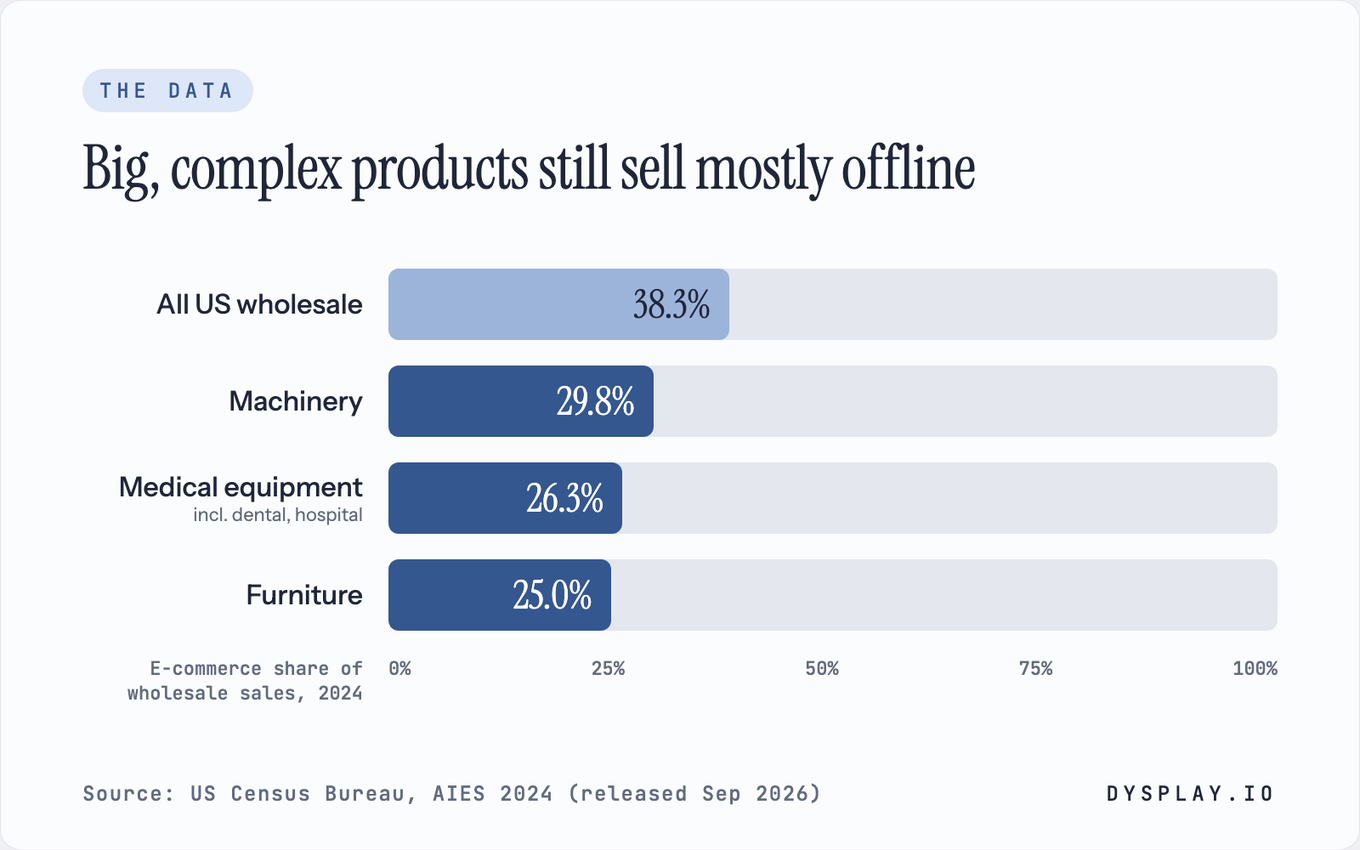
- Big products still sell through people. US Census data for 2024 puts e-commerce at 38.3% of all wholesale sales, but only 29.8% for machinery wholesalers, 26.3% for medical, dental and hospital equipment and 25.0% for furniture, and those figures include automated EDI orders. Most of these sales are still ordered offline, and a model gives the conversations around them something to look at.
- Making and showing 3D got cheap. AI tools turn product photos into a model in minutes, CAD tools such as SOLIDWORKS export the web format GLB directly, and free viewers show it in a browser with nothing to install. GLB is an ISO standard, so one file works on your website, in AR and on a call. The routes and prices are below.
A study of augmented reality in retail, published in the Journal of Marketing in 2022, found AR lifted sales most for pricier products and less popular brands, which the authors read as AR working best when shoppers are unsure about the product. It looked at a cosmetics retailer, not B2B, but expensive and hard to judge from a photo describes most machines and devices.
When 3D pays off in B2B (and when it doesn't)
Score each product line against four questions. As a rule of thumb, two or more "yes" answers make an accurate model from your CAD worth the work. With one "yes", a quick AI model from photos is cheap enough to try and see whether buyers use it.
- Is it too big or heavy to bring to a first meeting? A packaging line, a treatment chair or a reception desk can't come to the buyer. A model can.
- Does it come in many configurations? Showing ten variants in photos means ten photo shoots. One model, or a set of models from the same CAD, covers them for less.
- Is the important part hidden? Buyers of machines and devices often care about what sits behind the cover: drives, filters, service access. A cutaway model, or one with the housing left off, can show it.
- Do the people who decide never see it in person? Purchasing, finance and management rarely visit the trade show stand. They decide from what they're sent.
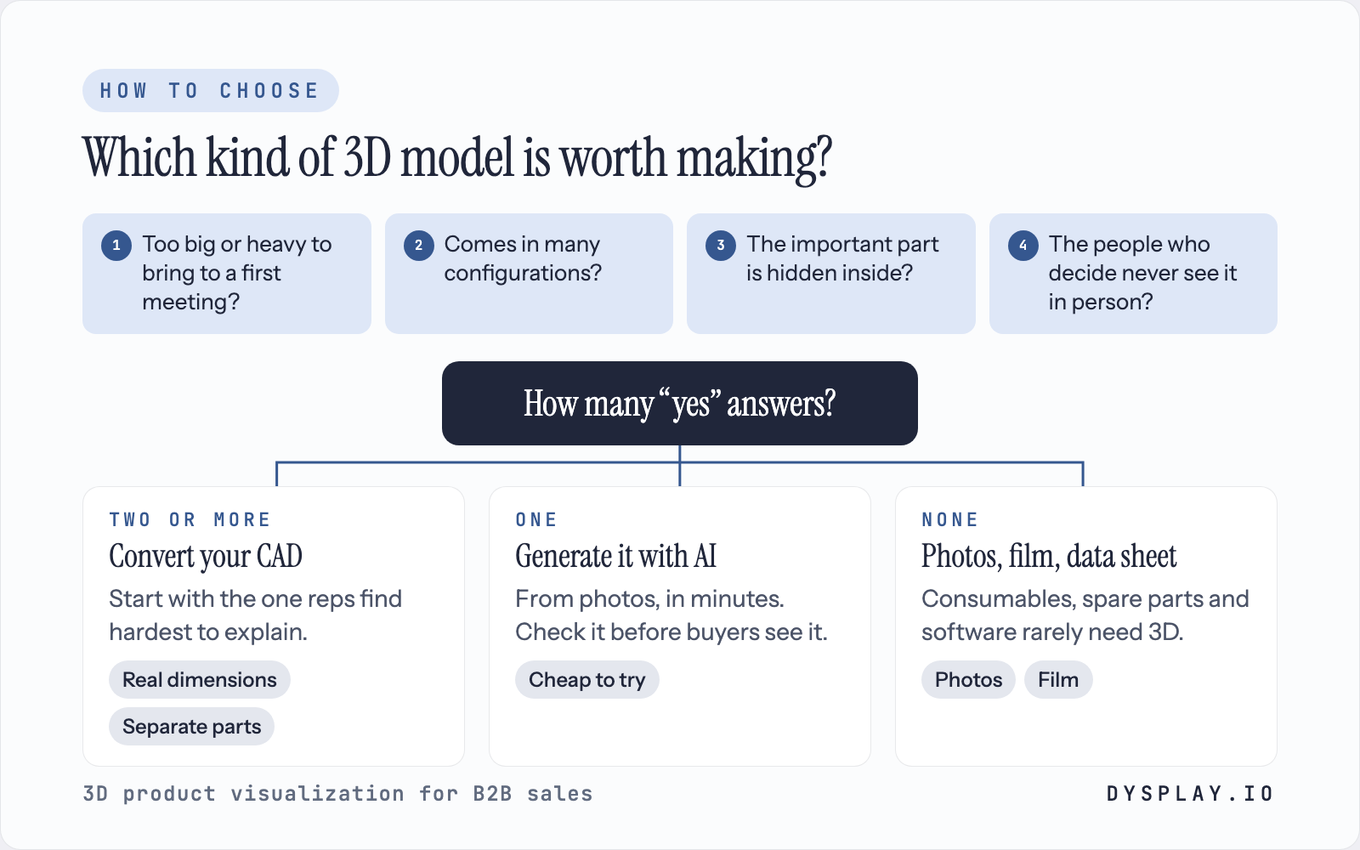
3D rarely pays off for consumables, spare parts the buyer already knows by number, or software. A spare-parts buyer wants the part number and the price. A software buyer wants to see the product working in a live demo.
It also doesn't replace touch. Buyers who need to hear a machine run or feel a fabric will still want a visit, a sample or a demo unit. A model gets you to that step with fewer wasted trips.
Who on the buying team needs to see what
Forrester's 2026 State of Business Buying research counts an average of 13 internal and 9 external influencers in a purchase. They don't all look at a model the same way.
- The engineer or technician wants dimensions, connections, service access and what's inside. They'll ask to turn the model themselves.
- The user (an operator, a clinician, a designer) wants to know how it handles in daily work. A short film of the product in use often answers that better than a model.
- Purchasing wants to compare options and prices side by side.
- Management wants a short, clear picture of what they're buying and why, often on a phone between meetings.
That's why a model alone rarely closes anything. It works when the data sheet, the options and the price sit next to it, and when the people who missed the meeting can open the same thing later.
How manufacturers use 3D on their websites
Look at the sites of manufacturers that already use 3D and you see four patterns. Many use more than one.
| Use | What the buyer does | Example |
|---|---|---|
| Configurator with AR | Picks a version, then sees it at full size in the room through a phone | Vitra: for products with AR, a symbol in the configurator opens a QR code for the phone |
| CAD and 3D downloads | Drops the product into their own floor plan or robot cell | Steelcase's 3D models and CAD library; Universal Robots' CAD files for engineers building its robots into a cell |
| Viewer on the product page | Turns and zooms the product before contacting anyone | Shopify, for example, accepts GLB and USDZ files as product media |
| Models on sales calls and in follow-up links | Asks questions while the seller turns the model, then reopens it later | Virtual selling platforms, such as Dysplay |
Configurator with AR
- What the buyer does
- Picks a version, then sees it at full size in the room through a phone
- Example
- Vitra: for products with AR, a symbol in the configurator opens a QR code for the phone
CAD and 3D downloads
- What the buyer does
- Drops the product into their own floor plan or robot cell
- Example
- Steelcase's 3D models and CAD library; Universal Robots' CAD files for engineers building its robots into a cell
Viewer on the product page
- What the buyer does
- Turns and zooms the product before contacting anyone
- Example
- Shopify, for example, accepts GLB and USDZ files as product media
Models on sales calls and in follow-up links
- What the buyer does
- Asks questions while the seller turns the model, then reopens it later
- Example
- Virtual selling platforms, such as Dysplay
The first three serve buyers who research alone. The fourth serves the buying group once a conversation has started. If your deals start with a rep, the call is often the better first place for a model: you hear which parts buyers ask about, and those views then earn a place on the website.
Four ways to get a 3D model in 2026
Until recently there were two routes: convert your CAD, or pay a studio. AI generation and scanning have added two more, and AI has changed the price of a first model most.
| Route | Best for | Typical cost |
|---|---|---|
| Generate it with AI from photos | A first model, fast, to show shape and look | Meshy Pro: €19 a month for up to 100 models |
| Convert your CAD | Real dimensions, cutaways and many variants | Mostly time, plus a converter if your CAD can't export GLB |
| Scan the real product | Products that exist but have no usable CAD | Depends on the tool and the size of the product |
| Hire a studio | A hero product where looks matter | About $60 to $375+ per model at volume |
Generate it with AI from photos
- Best for
- A first model, fast, to show shape and look
- Typical cost
- Meshy Pro: €19 a month for up to 100 models
Convert your CAD
- Best for
- Real dimensions, cutaways and many variants
- Typical cost
- Mostly time, plus a converter if your CAD can't export GLB
Scan the real product
- Best for
- Products that exist but have no usable CAD
- Typical cost
- Depends on the tool and the size of the product
Hire a studio
- Best for
- A hero product where looks matter
- Typical cost
- About $60 to $375+ per model at volume
Generate it with AI from photos
Image-to-3D tools take one or a few photos of a product and return a textured model you can download as GLB. Meshy is the best known of several. Its Pro plan costs €19 a month for 1,000 credits, which its pricing page counts as up to 100 models, and paid plans give you private, commercial rights to what you make. Free-plan models come under a CC BY 4.0 license, which allows commercial use but requires credit to Meshy, so the free plan is the wrong place to build a brand's catalog. Open models such as Microsoft's TRELLIS.2, released under the MIT license, can run on your own GPU server, though some NVIDIA components it relies on have their own license terms.
Read the license of an open model before you use it. Tencent's Hunyuan3D 2.1 license, for example, does not apply in the European Union, the United Kingdom or South Korea, so a company there can't use it or its output under that license.
AI gets the overall shape and look right, in minutes instead of weeks. What it gets wrong matters in B2B:
- It guesses what it can't see. A single photo shows one side, so the back and the underside are invented. Several photos from different angles help, and Meshy's paid plans take them.
- It isn't measured. At best the proportions are right, not your dimensions, so the model can't answer whether the machine fits the hall.
- Small details come out soft. Lettering, logos, cables and thin parts are often blurred or merged into the body.
- It's one piece. The output is a single mesh by default. Some tools, Meshy among them, can split it afterward, but the parts are guessed from the shape, not your real components, so opening a cover or hiding the guarding rarely works.
We see this when we prepare models for customers' calls. An AI model of an aesthetic device came back as a single mesh, and its lettering, handpieces and cables had to be rebuilt in Blender before it looked like the real product. A simple rule follows: use an AI model to show what a product is and what it looks like, and a CAD model for anything an engineer will sign off.
Convert your CAD
If you make the product, engineering almost certainly has it in CAD. That's a head start, but CAD isn't a sales asset. Engineering files carry every screw and internal part, and they can run to hundreds of megabytes. A buyer's browser needs a light model in a web format.
The common web format is glTF, maintained by the Khronos Group, which calls it "the JPEG of 3D." Its binary form, GLB, packs the model and its textures into a single file. glTF 2.0 is also an ISO standard (ISO/IEC 12113:2022).
The route from CAD to a sales-ready GLB usually looks like this:
- Export. Some CAD tools save GLB directly. SOLIDWORKS, for example, offers "Extended Reality Binary (*.glb)" under File > Save As. Others export STEP, which a converter then turns into GLB.
- Simplify. Remove internal parts the buyer doesn't need and reduce the polygon count so the model loads on a phone. Desktop tools do this locally. RapidPipeline, for example, imports 60+ CAD formats, and its single-seat desktop plan is listed at $90.83 per month billed annually.
- Add materials. Some converters give you geometry only. Shopware's CAD-to-GLB conversion, for instance, says plainly that it "does not include materials, textures, or lighting." Even a native export that carries CAD appearances rarely looks right on a sales call, so someone has to make steel look like steel.
- Protect what's yours. Leave out the internals you don't want competitors to see. A simplified viewing model doesn't carry engineering tolerances, which is another reason not to send the raw CAD.
- Test it where buyers will see it. Open it on an older laptop and a phone over a normal connection. If buyers are left waiting for it to appear, simplify again.
Scan the real product
For a product that exists but has no usable CAD, such as an older machine, you can capture it instead. Photogrammetry builds a mesh from many photos taken around the product. A newer method, Gaussian splatting, captures a photo-real look from photos or video, and the Khronos Group has ratified a glTF extension for it, so splats are moving toward the same standard file format. Splats look real but are hard to edit, and not every viewer shows them yet.
What it costs
Prices vary with complexity and volume, so take published numbers as a starting point for a quote. An AI model costs cents in credits on a paid plan, plus any time spent fixing it. A studio costs more. CGI Furniture lists $60 for simple models, $100 for medium, $300 for complex and from $375 for highly complex ones such as mechanisms and assemblies, for Amazon-spec models at volumes of 200 or more a year, and quotes CAD conversion per file. UFO3D puts a typical product model at about $200. Both studios lean toward furniture and consumer goods, so expect a large machine with many assemblies to be quoted higher.
The bigger cost is upkeep. Every product revision means a model update, and a model that shows last year's housing creates questions you don't want on a sales call. Give the models an owner, just like price lists.
The four routes mix well. Generate an AI model to test whether buyers care about 3D at all. Convert CAD in-house once a product line proves it, which keeps updates fast. Use a studio for a hero product where looks matter, and scan what has no CAD.
AR product visualization: worth it when space is the question
Augmented reality places the model in the buyer's own space through a phone camera. It helps where fit and scale decide: furniture in an office or lobby, a device in a treatment room, a machine on a shop floor with tight clearances.
You don't need an app. Google's open-source model-viewer web component can launch AR from a web page on Android and on iPhone, and it generates the USDZ file Apple's Quick Look needs from your GLB on the fly. For most B2B sellers, AR comes with the website viewer and needs no separate project. The viewer itself can be free, as model-viewer is, or a hosted service: Sketchfab, for example, has a free plan and a Pro plan at $15 per month billed yearly.
Website viewer or live on a call?
Buyers do much of their research alone. Gartner found that 67% of B2B buyers prefer a rep-free experience (survey of 646 buyers, August to September 2025). A model on your product page can help get you onto their shortlist.
The same buyers still want a person at some point. In a parallel Gartner survey, 69% said they prefer to validate AI-generated insights with a sales rep. McKinsey's 2026 B2B Pulse lists videoconferencing among the top five channels buyers use to find and evaluate suppliers.
A website viewer answers the questions a buyer knows to ask. A model shown on a live call answers the ones they didn't know to ask, because the seller turns it to the part that matters for their plant, clinic or project.
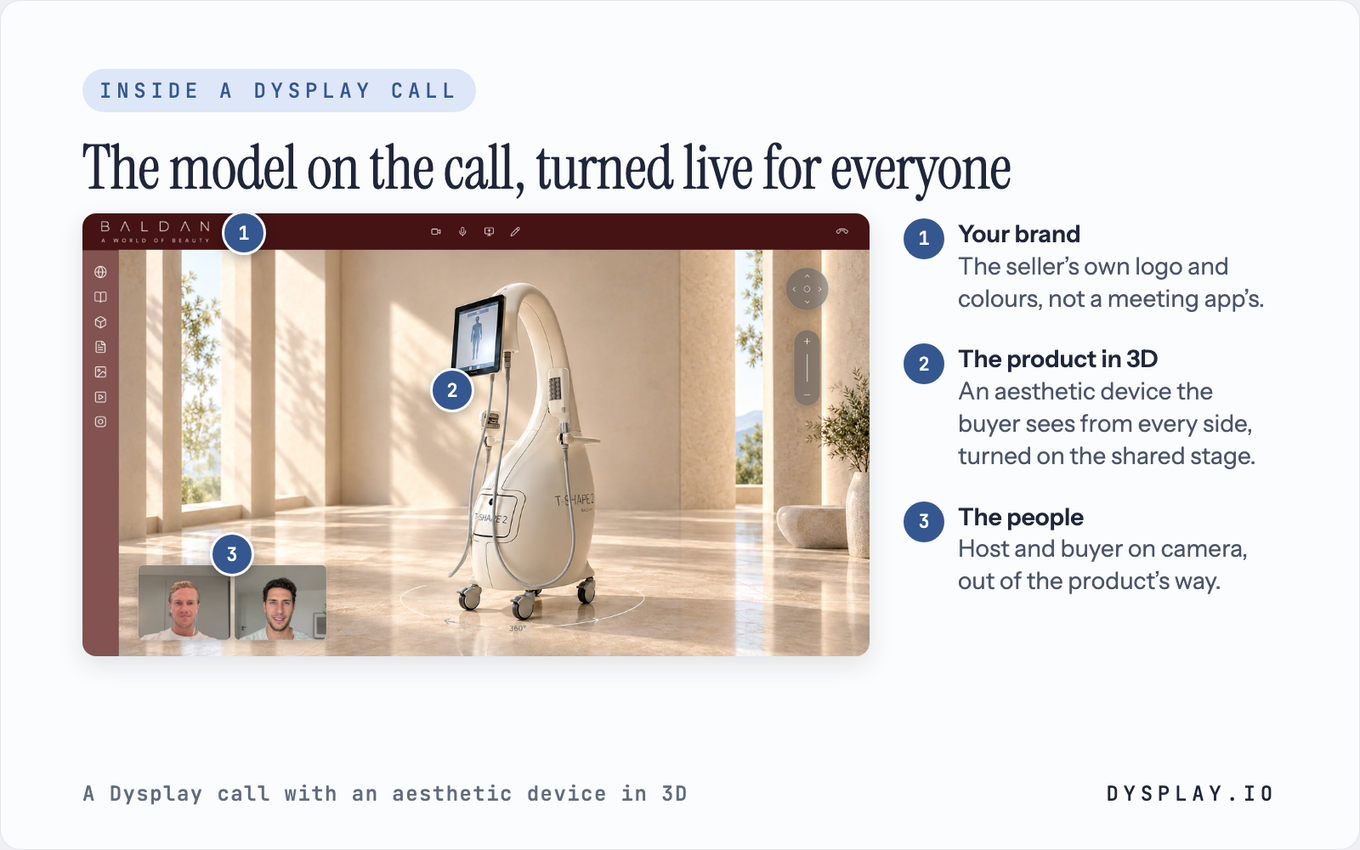
On a call, whether that's a video call with a 3D viewer or 3D presentation software built for sales, the seller can switch to a model with the access panel open, point at the filter, open the data sheet when the engineer asks and come back to the model. The buyer can take control and look for themselves. Afterward, the people who weren't there need the same model in a link they can open themselves.
Most B2B sellers end up with both. If buyers mostly find you through your website, start there. If deals mostly start with a rep, start on calls, where you learn which views buyers ask for, then publish those views on the website.
Four examples
These are illustrations of how the approach works, not customer stories.
A machine builder
A packaging machine maker could convert the CAD of its main line into a simplified GLB, plus a second version with the guarding removed. On the first call with a food producer, the rep turns the model to the changeover parts, opens a short film of a changeover, and shows the layout drawing when the engineer asks about floor space. Purchasing and the plant manager get a link to the same models afterward. The 90-day sales enablement plan for manufacturing shows where this fits in a wider plan.
A machinery dealer without CAD
A dealer in used machines has no CAD for most of what it sells. A quick AI model made from the listing photos gives a buyer in another country something to turn before booking a trip, as long as the listing says the model is illustrative and the data sheet carries the dimensions.
A contract furniture maker
A maker of office seating with dealers in several regions could generate quick AI models of older chair families from catalog photos and convert the CAD of its new range, where finishes and dimensions matter. Dealers then show the same models the factory uses. AR on the website lets a facilities manager see a chair at full size in their own meeting room before asking for samples.
A medical or aesthetic device maker
Demo units are often scarce. In McKinsey's 2021 survey of 897 physicians, the demonstration was the one part of the sales process they still wanted in person. A 3D model with points on the handpieces and the screen, each opening a short film or the data sheet, can answer the early questions about size, handpieces and setup in a first remote meeting, so the demo unit goes to the clinics that are ready.
How to present a product in 3D on Dysplay
Disclosure: we make Dysplay, so read this section with that in mind.
Dysplay is a virtual selling platform for live sales calls in your own brand. A 3D model sits in a showroom next to your documents, films and photos. Dysplay doesn't make the model for you: bring a GLB from any of the routes above. Then it takes five steps:
- Upload the GLB. Add the file to the showroom's content. Dysplay takes GLB, or glTF with its textures embedded, up to 100 MB, and saves a snapshot of the model as its picture.
- Pick a background. Each model can have its own background picture or colour, or you set one for every model in the showroom.
- Add points on the model. Click a spot on the model, such as a filter, a handpiece or a service panel, and attach a photo, a film or a PDF to it. Points belong to the model, so every showroom that uses it has them.
- Present it on the call. The model sits on the shared stage and turns like a turntable, so nobody ends up looking at it from underneath. You turn it for everyone, or give a guest control when the engineer wants to look for themselves. Open a point, or walk through all of them in order with Next and Back: everyone's view moves to that part and the card opens beside it.
- Send it afterward. After the call you send the showroom as one link. Buyers turn the model and open the points themselves, and you see which items each visitor opened and for how long.
If your configurator runs in a browser, you can open it in the call's shared browser and drive it. Buyers join from a browser link with nothing to install. Our page on virtual showroom software for manufacturers shows the setup.
Good fit if your sales start with a conversation and you want the model, the documents and the follow-up in one place.
Not the right fit if you need a configurator that swaps materials or finishes on one model live (Dysplay shows separate models in sequence), Gaussian splats, an AR viewer on your website, a self-service 3D experience buyers explore with no seller involved, or call data pushed into your CRM.
Frequently asked questions
What is the difference between 3D rendering and 3D product visualization?
Rendering produces images or film from a 3D model. Visualization is the wider practice of showing a product through 3D, which includes renders but also interactive viewers, AR and configurators where the buyer controls the view.
Can AI make a 3D model of my product from photos?
Yes. Image-to-3D tools such as Meshy return a textured GLB in minutes. The result looks like the product but isn't measured, and lettering and small parts often need fixing, so use it to show what a product looks like, not for technical sign-off.
How much does a 3D product model cost in 2026?
An AI-generated model costs cents in credits on a paid plan: Meshy's Pro plan is €19 a month for up to 100 models. A studio model runs from about $60 for a simple product to $375 or more for a complex one at volume. Converting your own CAD costs mostly time, plus a converter if your CAD tool can't export GLB.
Which file format should I use for 3D on the web?
GLB, the binary form of glTF, is the most widely supported format for browsers. Apple's AR Quick Look uses USDZ, but tools such as Google's model-viewer can generate it from your GLB. Keep the native CAD files for engineering and send buyers only the converted viewing model.
Do I need 3D models to sell remotely?
No. Photos, a good film and the data sheet answer most questions for many products. 3D adds the most for products that are large, configurable or hard to understand from the outside, and for buying groups who never see the product in person.
Is 3D the same as 360-degree product photos?
No. A 360-degree spin is a sequence of photos taken around the product, so the buyer can only see the angles that were photographed. A 3D model can be turned to any angle, zoomed and reused for renders and AR. Spins are cheaper when you already have the product in a studio; models win when the product is big, configurable or not built yet.
Is it safe to share 3D models of our products?
Share a simplified viewing model, never the engineering CAD. Converting to GLB drops the feature history and tolerances, but not the internal parts, so remove anything you don't want to show before the file leaves the building.
The takeaway
Don't start with the whole catalog. Pick the product your reps find hardest to explain. Make a quick AI model of it this week, or ask engineering for its CAD if dimensions matter, and use it on the next ten first calls. The questions buyers ask on those calls will tell you which parts deserve points, whether the model needs to be exact, and which views to put on the website. For the rest of the toolkit, see our overview of the types of virtual selling tools and our guide to what a virtual showroom is. If you want to see a model on a live call, book a walkthrough.
Sources
- Khronos Group, glTF overview and ISO/IEC 12113:2022: khronos.org/gltf
- SOLIDWORKS Help, "Exporting Using Extended Reality" (2025): help.solidworks.com
- RapidPipeline, pricing (accessed November 2026): rapidpipeline.com/pricing
- Shopware, CAD to 3D file conversion documentation: docs.shopware.com
- CGI Furniture, GLB 3D model services and prices (accessed November 2026): cgifurniture.com
- UFO3D, "3D product visualization: the formats, the economics and where to start": ufo3d.com
- Google, model-viewer documentation (ar-modes attribute): modelviewer.dev
- Sketchfab, plans (accessed November 2026): sketchfab.com/plans
- Gartner, "Gartner Sales Survey Finds 67% of B2B Buyers Prefer a Rep-Free Experience," March 2026 (646 buyers, Aug–Sep 2025): gartner.com
- Gartner, "Gartner Survey Finds 69% of B2B Buyers Turn to Sales Reps to Validate AI-Generated Insights," May 2026 (645 buyers, Aug–Sep 2025): gartner.com
- 6sense, 2025 Buyer Experience Report (nearly 4,000 buyers): 6sense.com
- Forrester, "The State of Business Buying, 2026": forrester.com
- McKinsey, B2B Pulse 2026, "The surprising economics of B2B growth" (n=3,664, fielded December 2025): mckinsey.com
- McKinsey, "The future of medtech sales is hybrid," 2022 (2021 survey of 897 physicians): mckinsey.com
- US Census Bureau, 2024 Annual Integrated Economic Survey, e-commerce table AIES00ECOM (released September 2026): data.census.gov
- Tan, Chandukala and Reddy, "Augmented Reality in Retail and Its Impact on Sales," Journal of Marketing 86(1), 2022: ama.org
- Meshy, pricing and plan comparison, regular prices before first-month offers (checked 17 November 2026): meshy.ai/pricing
- Meshy, web app pricing and credits documentation: docs.meshy.ai
- Microsoft, TRELLIS.2 repository (MIT license): github.com/microsoft/TRELLIS.2
- Tencent, Hunyuan3D 2.1 Community License: github.com/Tencent-Hunyuan/Hunyuan3D-2.1
- Khronos Group, KHR_gaussian_splatting glTF extension (status: ratified): github.com/KhronosGroup/glTF
- Vitra, Augmented Reality: vitra.com
- Steelcase, 3D Models/CAD: steelcase.com
- Universal Robots, CAD files and robot models: universal-robots.com
- Shopify, "Support for .usdz 3D models as product media," December 2021: changelog.shopify.com
About the author
Sebastian Deuster · Co-founder, Dysplay
Sebastian Deuster is co-founder of Dysplay. He was an account executive at Salesforce and worked at an AI fintech before building several SaaS businesses of his own, each with the same aim: helping companies work more efficiently.